
The landing layer for coding agents
pytxo land refuses agent branches that pass alone but fail together.
$ pytxo land agent/rename agent/discount --check "node run-tests.js" --per-input
pytxo land  rcpt_20261025T095419Z_77822d97  shadow
target main @ 80a1e9db5 · 2 inputs · 3 files changed

inputs
  agent/rename                       1 file   merged
  agent/discount                     2 files  merged

checks
  input:agent/rename           pass           0.2s  node run-tests.js
  input:agent/discount         pass           0.2s  node run-tests.js
  combined                     FAIL exit 1    0.2s  node run-tests.js
      FAIL discount.test.js: price is not a function
  combined, run 2              FAIL exit 1    0.2s  node run-tests.js
      FAIL discount.test.js: price is not a function

! Every input passed its checks alone. The combined change failed both times it ran.

decision  BLOCKED
  - combined check failed twice: node run-tests.js (exit 1, then exit 1)
next      fix the failure on one of the branches (or fix the check), then run the same command again
output    pytxo receipts show rcpt_20261025T095419Z_77822d97
inspect   git log --oneline --graph refs/pytxo/land/rcpt_20261025T095419Z_77822d97
receipt   D:\pybench-shop\.git\pytxo\receipts\rcpt_20261025T095419Z_77822d97.json
price() to unitPrice(); the other adds code that calls price(). Each passes the test on its own. Together the test fails, and fails again when pytxo reruns it, so nothing lands. Raw output and receiptGive it the branches your agents left, from Claude Code, Codex or any other tool, and the command that tests your project. It merges them in a separate worktree and runs that command on the result. Your branch moves only when the result passes and you add --apply.
npm i -g pytxo@1.3.6
I'm Matt (mattbaconz on GitHub), and I build Pytxo on my own. I gave Claude Code and Codex two tasks on lukeed/mri that collide on one helper; both branches passed alone and failed together.
How it works
- step 01
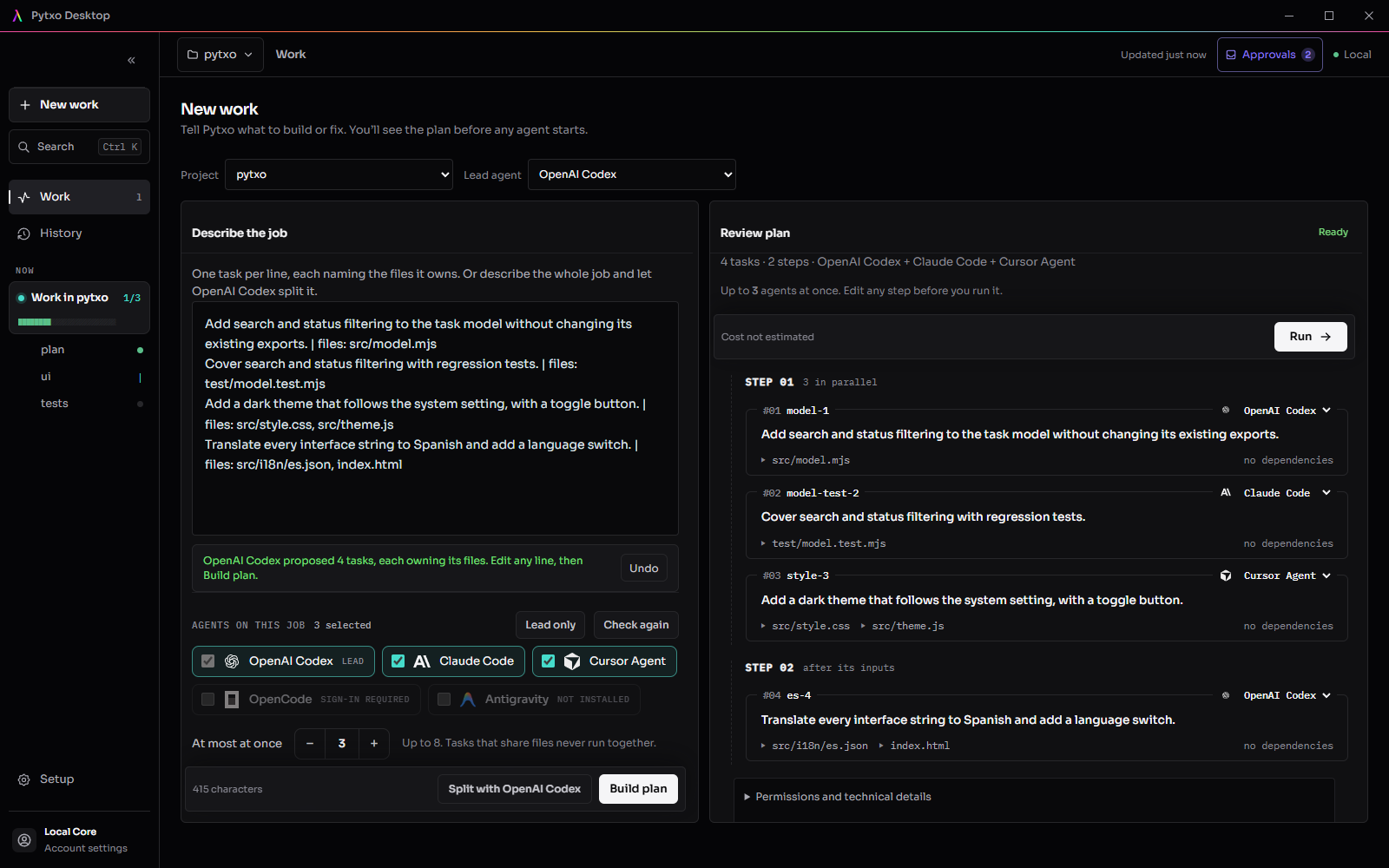
Describe it once. Get a plan.
Describe the whole job and let Codex or Claude Code read your project and split it, or write one task per line yourself. Each task owns its files, anything that shares a file runs in order, and you can edit any step before it runs.
- step 02
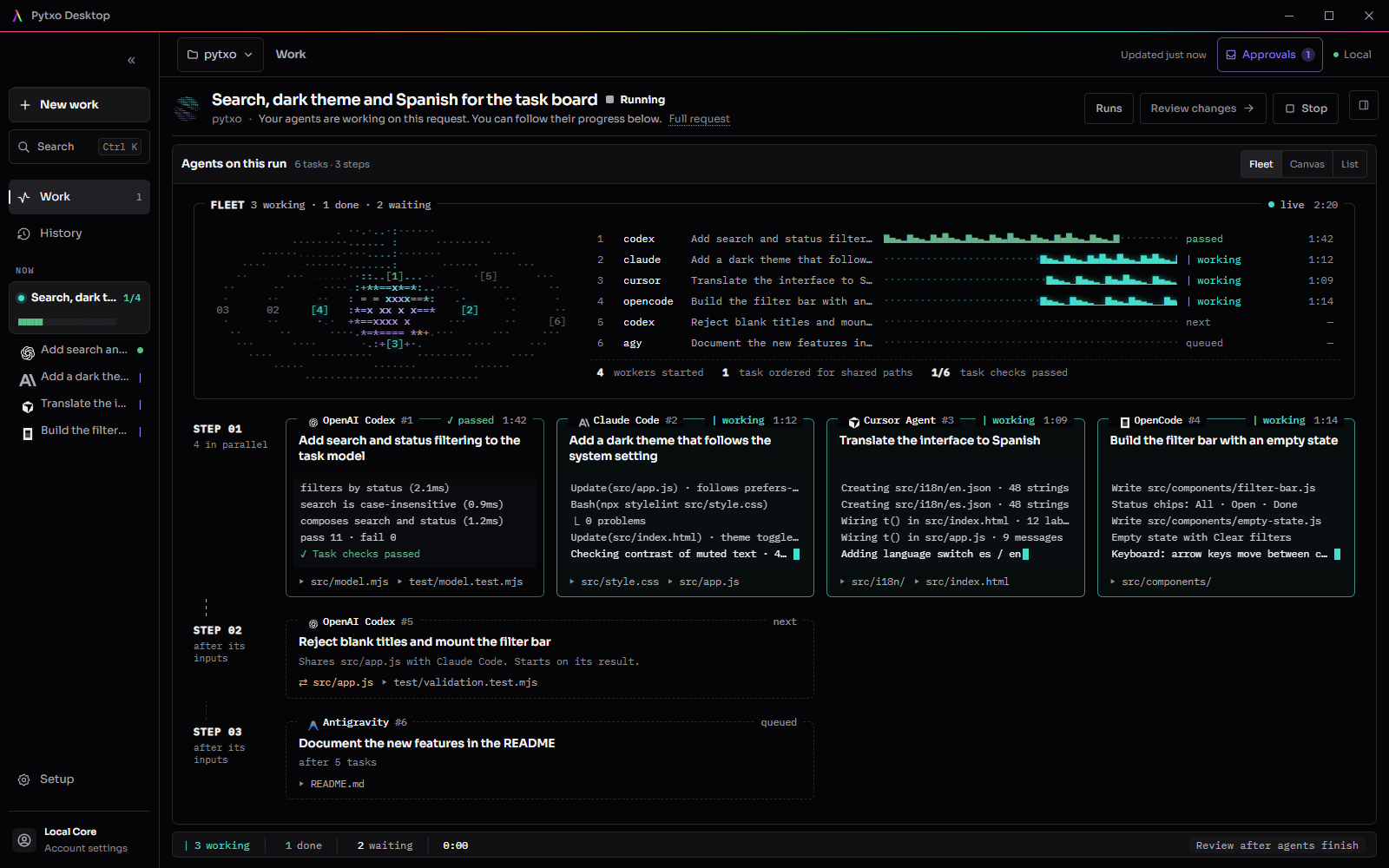
Agents work side by side.
Each task runs in its own isolated copy of your project with the CLI you assigned. When a task finishes, Pytxo runs your checks on it. An agent saying “done” is not a pass.
- step 03
Review one change. Apply exactly that.
See every changed line, which agent wrote it, and the checks Pytxo ran on all the changes together. Apply writes those exact files and refuses if your project changed after you reviewed.
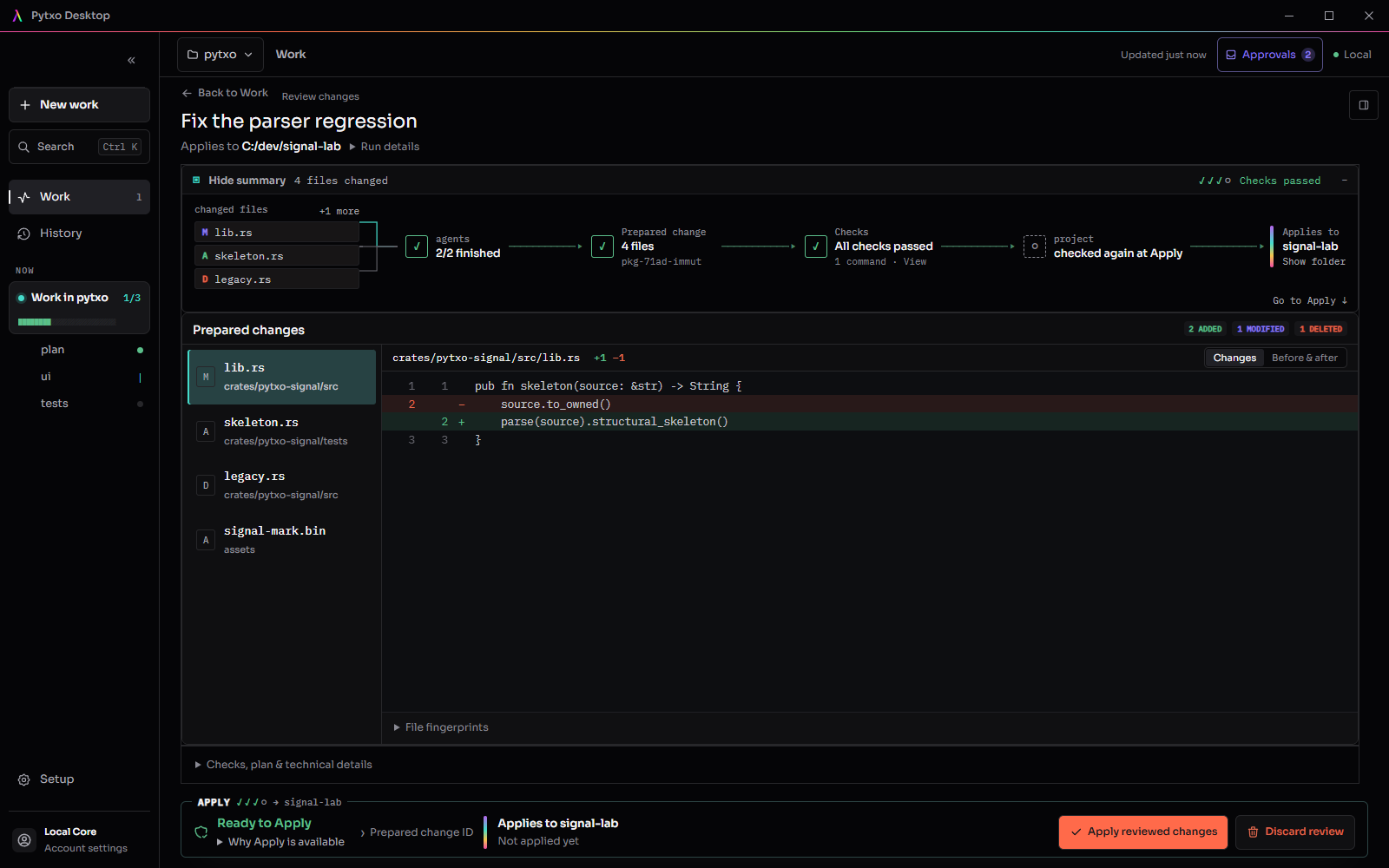
Screens are captures of Pytxo Desktop with sample data. Step 02 plays a sample run; real runs take minutes. Evidence records real runs and their limits.
Land branches from any agent tool.
Agent workspaces hand you one branch per agent. pytxo land checks them together before any of it reaches your branch.
- Any agent tool
- Branches from Orca, Conductor, Codex, Claude Code, Copilot or your own scripts. Label each with the agent that wrote it.
- The combined change
- Pytxo merges the branches in an isolated worktree and runs your checks on the result, and on each branch alone with --per-input.
- Same function, two agents
- Shared files are mapped to the functions and types each branch changed, so two agents editing one function are flagged even when Git merges cleanly.
- Shadow first
- By default nothing in your repository changes. --apply lands a ready result by fast-forward or compare-and-swap, and refuses if the branch moved.
- A receipt every time
- Each decision is written to .git/pytxo/receipts as an in-toto statement. --markdown prints a pull-request comment.
Why not just run agents side by side?
Agent workspaces give each agent its own branch and leave the merging to you. That works for separate tasks. Pytxo is for one job that several agents finish together, and pytxo land brings the same check to branches from those workspaces.
| Question | Agents side by side | Pytxo |
|---|---|---|
| You hand out | One task per agent | One request. Pytxo plans the split |
| Shared files | Overlap surfaces when you merge | A task that shares a file waits for its owner |
| Checks | Per branch, wherever you set them up | Run by Pytxo on every task and on the combined change |
| You review | One diff per agent | One change, with the agent behind each file |
| What lands | Whatever you merge | Exactly the reviewed files, refused if the project moved |
Measured, with the limits printed.
Pybench builds throwaway repositories where agent branches each pass their own checks but break together, and compares what per-branch CI would put on main with what pytxo land decides. It shows the mechanism, not how often it happens in real projects. Run it yourself with pytxo bench.
The live run used the released 1.2.4 Desktop with real Claude Code, Codex and Cursor Agent sessions in 10 min 50 s. Its checks passed and the applied app still had integration bugs the agents' tests missed. Checks passing is evidence, not proof.
- broken mains refused: per-branch CI would have landed them
- 4/4
- scenarios decided as expected
- 12/12
- good changes refused
- 0
- median gate time, checks included
- 3.1 s
- tasks from one paragraph, split by Claude Code
- 7
- agent CLIs, live, signed in
- 3
- reviewed files applied
- 14/14
- project tests passing after Apply
- 22/22
Runs on your machine, with your accounts.
Pytxo coordinates the agents you already use. It does not route your code through a Pytxo server.
Check setup requirements →- Desktop
- Windows x64. On macOS and Linux the CLI covers runs, Review, Apply and pytxo land; Desktop for them is not built yet.
- Agents
- Codex, Claude Code and Cursor Agent, verified live. OpenCode and Antigravity in beta. One is enough to start.
- Accounts
- Each agent signs in with its own account. Pytxo needs none; a free one adds sharing perks.
- Keys
- Agents run with a clean environment: your shell's API keys are not passed to them.
- Project
- A Git repository with the tools its build and tests need.
- Cost
- No Pytxo charge for local work. Your agent subscriptions bill as usual.
- Source
- Open source under the MIT license, on GitHub.
Questions
Your agents write the code. You decide what lands.
Start with one agent
and a real fix.
Pick a small bug with a test you can run. Once you trust the loop, add agents and give them a bigger job.
Download for Windows